Fix Stale HTML After Every Next.js Deploy

by Abdelkader Settah
May 14, 2026
Every deploy you ship is invisible to a chunk of your users. They keep seeing the old version until they hard-refresh or clear the browser cache. The QA team flags it. Support tickets pile up. You ship a release, nobody sees it.
This post explains why it happens on a default Next.js setup, why “just hash the HTML” doesn’t work, and the two properties in next.config.mjs that fix it.
This post assumes familiarity with Next.js, basic HTTP caching, and the difference between server-side and browser caches.
Last updated: 13 May 2026.
TL;DR
Add generateBuildId and a headers() rule to next.config.mjs. The headers() rule tells the browser never to cache HTML and to cache /_next/static/* forever. Every deploy gets a fresh HTML response, every hashed asset stays cached until its URL changes. Users see updates the next time they navigate, with no hard-refresh.
The symptom
The shape of the bug always looks the same:
- You ship a release. New JavaScript, new HTML, new everything.
- A user who visited the site before navigates back.
- The browser serves them the previously-cached HTML.
- That HTML references the old JS chunks (which are also cached).
- They see the old version. The new release effectively does not exist for them.
- They eventually hard-refresh or clear cache and see the new build.
You can confirm it in DevTools by hard-refreshing once (you see the new build) and then navigating away and back (you see the old build again).
Why it happens by default
Next.js puts hashed assets in /_next/static/<buildId>/.... Those filenames change every build, so the browser cache works correctly for them. The asset URL itself is the cache key, and a new deploy means new URLs.
HTML is different. HTML lives at the route path (/, /games, /promotion). The URL does not change between deploys. The browser caches the HTML response under that path, and on the next navigation it reuses the cached version without asking the server. The old HTML still references the old JS, so the page renders the old release.
This is browser behavior, not a Next.js bug. Without explicit Cache-Control headers, the browser is free to apply its own heuristic freshness rules (defined in RFC 9111, the HTTP caching specification) to the HTML. For most static-looking responses, that means caching for a while.
Why “just hash the HTML” is the wrong fix
The first instinct is “put the HTML under /_next/static/ too, then the URL changes every deploy.” That breaks more than it fixes:
- Every bookmark a user saved (
/games,/promotion,/blog/post-slug) returns 404. - Every Google search result pointing at
/gamesreturns 404. SEO tanks overnight. - Every internal link via
<Link href="/promotion">breaks the moment the build ID rotates. - Every external referral, every social card preview, every share link breaks.
HTML URLs have to stay stable because they are public identifiers. The fix is not to move the HTML. The fix is to tell the browser not to cache it.
The fix: two properties in next.config.mjs
Two additions to your existing nextConfig object.
// next.config.mjs
const nextConfig = {
  // ...existing config (reactCompiler, images, etc.)

  generateBuildId: async () => `buildId-${Date.now()}`,

  async headers() {
    return [
      {
        source: "/:path*",
        has: [{ type: "header", key: "accept", value: ".*text/html.*" }],
        headers: [{ key: "Cache-Control", value: "no-store, must-revalidate" }],
      },
      {
        source: "/_next/static/:path*",
        headers: [
          {
            key: "Cache-Control",
            value: "public, max-age=31536000, immutable",
          },
        ],
      },
    ];
  },
};
Two things are happening.
What generateBuildId does
generateBuildId: async () => `buildId-${Date.now()}`,Next.js needs a build ID to namespace your static assets. By default it generates one automatically, and that works fine. Setting generateBuildId explicitly gives you a deterministic, timestamped value you can rely on (in logs, in error tracking, in CDN purges if you ever need them).
Date.now() runs at build time, not request time. Every next build produces a fresh timestamp, and that timestamp becomes the folder name for every JS and CSS chunk: /_next/static/buildId-1736531234567/.... So every deploy ships unique asset URLs.
That alone is not the fix. Hashed asset URLs already changed between deploys by default. The fix is the headers() rule below, which leans on that property.
What the headers rule does
async headers() {
  return [
    // Rule 1: HTML pages
    {
      source: "/:path*",
      has: [{ type: "header", key: "accept", value: ".*text/html.*" }],
      headers: [
        { key: "Cache-Control", value: "no-store, must-revalidate" },
      ],
    },
    // Rule 2: hashed static assets
    {
      source: "/_next/static/:path*",
      headers: [
        {
          key: "Cache-Control",
          value: "public, max-age=31536000, immutable",
        },
      ],
    },
  ];
}
Rule 1, HTML pages. The has clause matches only requests with Accept: text/html. That is what a browser sends on a page navigation. no-store tells the browser to never persist the response. must-revalidate says if you did keep a copy, you have to check with the server before using it. Net effect: the browser asks the server for fresh HTML every time the user navigates. The Cache-Control directives behave as defined in the HTTP caching specification and described in detail on web.dev.
The has filter is important. Your API routes return JSON (Accept: application/json) or binary or XML. They do not match this rule, so their caching is untouched. Same for sitemap routes (XML) and any custom routes with their own Cache-Control.
Rule 2, /_next/static/* assets. public, max-age=31536000, immutable says cache for a year and never revalidate. Safe because every deploy gives these assets new URLs. The browser will never need to ask if /_next/static/buildId-X/page-abc.js has changed. If a new build needs different code, it ships under /_next/static/buildId-Y/page-def.js, a brand-new URL, fetched fresh. This is the same approach the Next.js headers config is designed for.
How the flow changes
The next time a user navigates after a new deploy:
- Browser requests
/games. The cached HTML hasno-store, so the request hits the server. - Server returns fresh HTML referencing
/_next/static/buildId-Y/.... - Browser sees new asset URLs, fetches them. The old
/_next/static/buildId-X/...chunks stay in cache but are never requested again. - User sees the new build immediately, no hard-refresh.
Before vs after, step by step
| Step | Before (default Next.js) | After (Cache-Control fix) |
|---|---|---|
| 1. Deploy ships | New buildId, new chunks | New buildId, new chunks |
2. User revisits /games | Browser serves cached HTML, no server request | no-store forces a fresh server request |
| 3. HTML references | Old buildId-X asset URLs | New buildId-Y asset URLs |
| 4. JS chunks | Loaded from old build | Fetched fresh from new build |
| 5. Result | Old build until hard-refresh | New build, no hard-refresh |
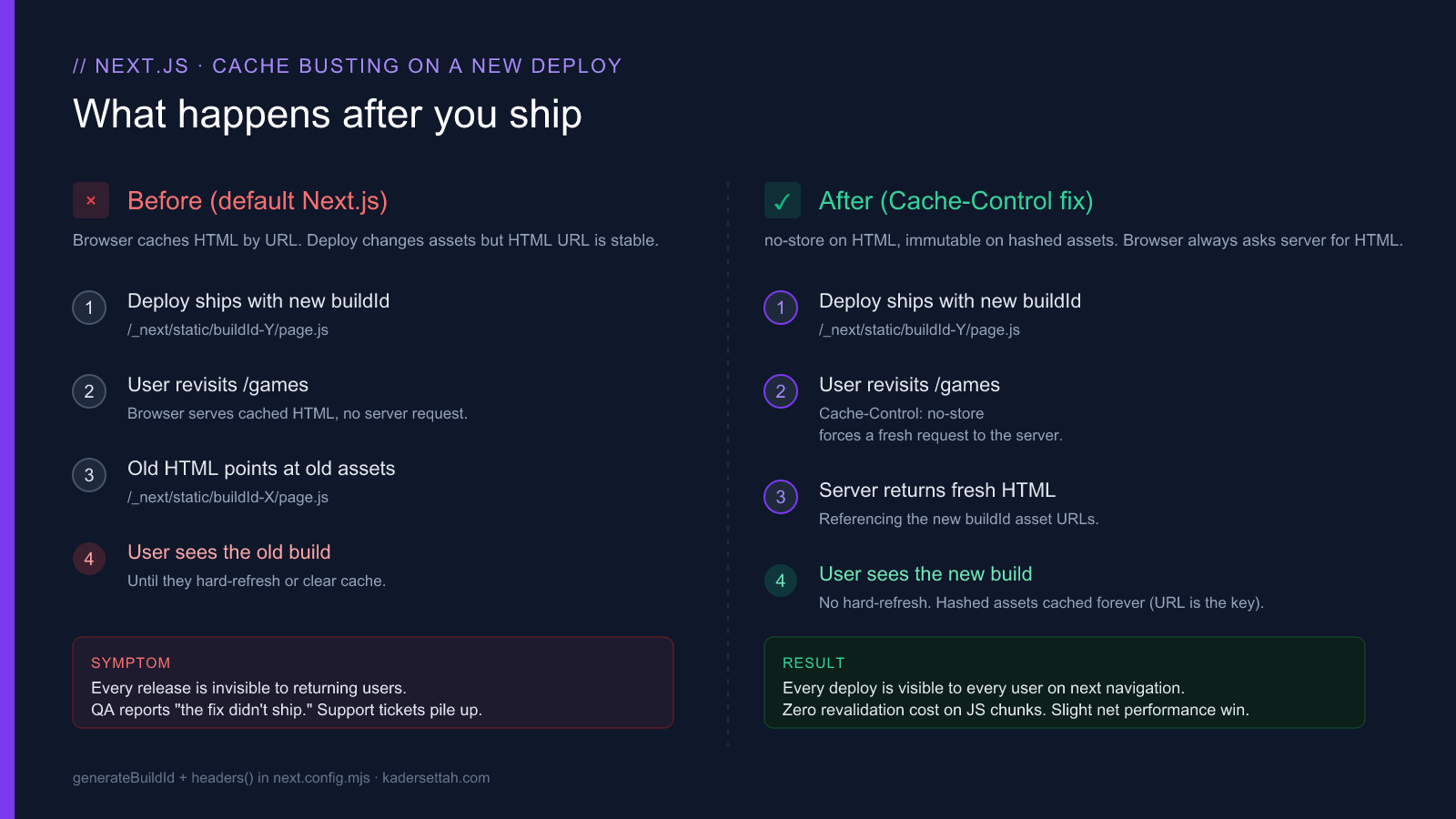
Verifying it works
After deploying, open DevTools and check two things in the Network tab.
For the HTML document request:
Cache-Control: no-store, must-revalidateFor any request under /_next/static/:
Cache-Control: public, max-age=31536000, immutableThen do the previously-failing test. Navigate to the site, deploy a new build, navigate back. You should see the new build without hard-refreshing.
What this does not fix
Worth being explicit about the edges:
- CDN caching layers. If you sit behind Cloudflare, Vercel Edge, AWS CloudFront, or any edge that caches HTML, you need to make sure the edge respects
no-storeor has its own invalidation step on deploy. Most edge configs default to caching HTML aggressively. Check yours. - Service workers. If your app ships a service worker that caches HTML responses, the worker wins. The browser cache rule does not apply. Update the service worker to bypass HTML or revalidate on activate.
- Redux-persist and other client-side state. The browser cache fix has nothing to do with persisted application state. If your users carry stale state across releases, that is a separate problem (versioned state, migrations, key suffixes per release).
- ISR and
unstable_cacheon the server. Both are server-side caches and unrelated to browserCache-Controlheaders. They continue to work exactly as before.
One performance note
The added cost is one HTML round-trip per page navigation. The savings is zero revalidation requests on hashed JS chunks, which are now immutable instead of vaguely cached. For most apps this is a wash or a slight net win. It is not a regression.
If your HTML response time is poor enough that adding one round-trip per navigation hurts user experience, the cache headers are not your problem. Your TTFB is. Fix that separately (server caching at the edge, faster origin, lighter middleware).
Frequently asked
Will this break my API routes or sitemap?
No. The has: accept text/html clause means the no-store rule only applies to HTML page navigations. API routes return JSON (Accept: application/json or */*), XML sitemaps return XML, and neither matches the text/html filter. Their caching is untouched.
Does this work with the App Router and the Pages Router?
Yes, both. generateBuildId and the headers() function are framework-level options defined in next.config.mjs and apply regardless of router choice. The Cache-Control headers are emitted by the same middleware layer in both routers.
Will this affect ISR or unstable_cache?
No. ISR and unstable_cache are server-side caches between your Node process and the rendered output. The Cache-Control headers in this fix only change what the browser does with the response. Your server-side caches continue to work exactly as before.
Will users on slow connections see worse performance?
Marginally, once per page navigation. The HTML round-trip is no longer skipped via cache. In exchange, every hashed JS chunk becomes immutable and skips revalidation entirely. For most apps the math comes out neutral or slightly positive. If your TTFB is bad enough that one extra HTML round-trip materially hurts, the cache headers are not your problem, your origin is.
Why this matters beyond the one bug
The mental model that fixes this bug is the one to internalize for anything you ever serve:
- URLs are cache keys. A stable URL means a cacheable response. A volatile URL forces revalidation.
- HTML is a public identifier, JS chunks are an implementation detail. They have opposite caching requirements. Treat them differently.
no-storeon HTML,immutableon hashed assets is the right default for almost every modern frontend. Memorize it.
Two properties. One file. The “users see the old version after every deploy” bug goes away for good.
If your team is fighting cache-related production issues on a Next.js app, that is the smaller half of a broader performance and architecture conversation. I take on React and Next.js consulting engagements for product teams that need a senior frontend voice in the room, and run a fixed-scope Core Web Vitals audit for teams whose performance is slipping.